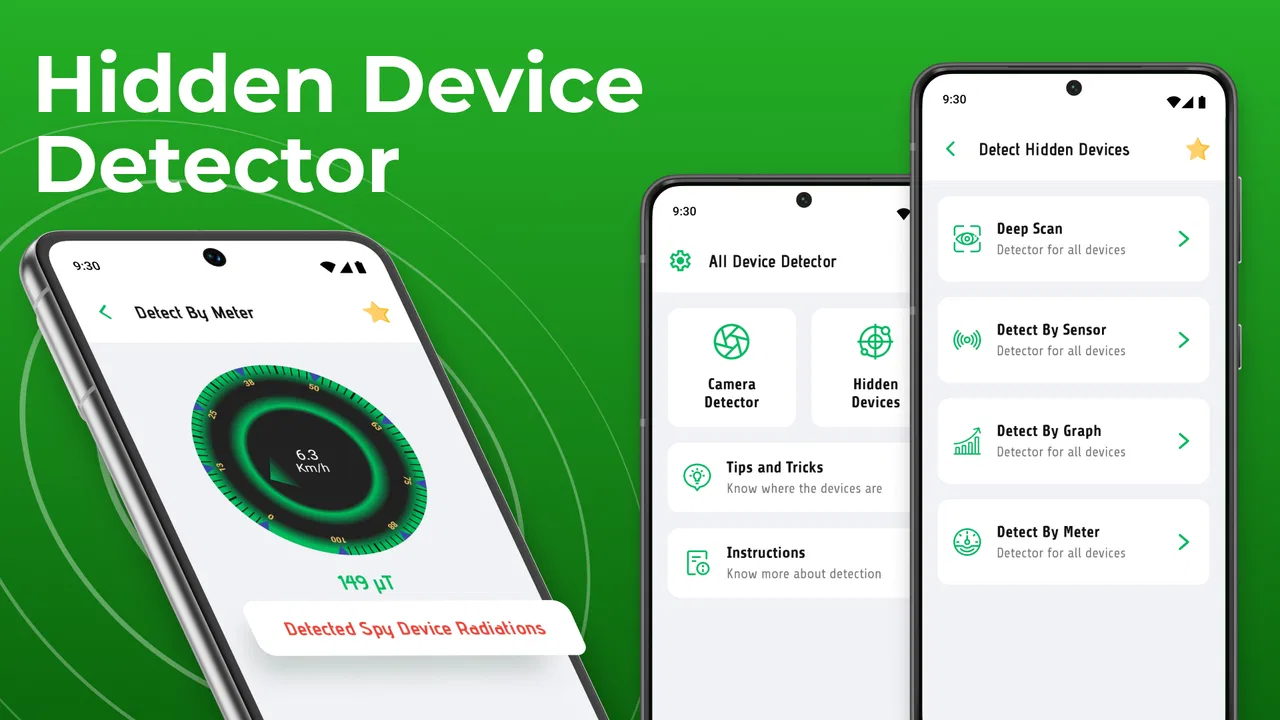
All Devices Detector finder
- 4.5
- Rating
- 5.00M
- Installs
- Free
- Price

 Analysis by App-foxy
I tried All Devices Detector finder as a privacy tool rather than treating it like a magic security scanner, and that distinction matters. Its purpose is straightforward: help you look for suspicious cameras and tracking devices around you. The app comes from DOSA Apps, is free to install, and sits in the tools category, where its usefulness depends less on flashy design and more on how sensibly you interpret what it detects.
My overall impression is positive, with an important qualification. This is a convenient first check when you enter an unfamiliar room, rent a holiday apartment, use a changing area, or simply want reassurance in a private space. It is not a substitute for a professional inspection, and it cannot turn every uncertain signal into proof of surveillance. Used with that realistic expectation, it can be a handy addition to a privacy-conscious routine.
How the current version fits into everyday privacy checks
The current release is version 4.1.1, and the app has been available since February 9, 2021. That history gives it more maturity than a brand-new utility, while the version number suggests an established product that has continued to be maintained rather than remaining frozen at its first release. I would still judge it by what it helps me do today: perform a quick, repeatable inspection without carrying specialist equipment.
You May Also Like

 Blood Strike: 2.5 Anniversary
Blood Strike’s Loadouts Turn Every Drop Into a Tactical Gamble
A close look at Blood Strike’s custom loadouts: how fast access to signature weapons reshapes its battle royale rhythm, rewards preparation, and narrows the gap between fights.

 Pandora - Music & Podcasts
Pandora’s Music Is Easy to Start, but Harder to Recover
Pandora’s strength is its low-effort path from a seed to a station. Its weak spot is how much confidence it asks you to place in connection, setup, and quiet recovery.

 8 Ball Pool
 Is Built on Rivalries, Rematches, and Routine
A close look at the rivalries, rematches, shared routines, and unanswered safety questions that turn a quick pool match into a persistent mobile community.

 Samsung Music
’s Quiet Strength Is Playing What You Already Own
Its reach comes less from spectacle than from dependable access to a personal library. That simplicity is both the app’s strongest retention engine and its ceiling.

 AccuWeather: Weather Radar
AccuWeather Review: A Quick, Clear Forecast for Everyday Decisions
For everyday plans, the best forecast is the one you can understand quickly. AccuWeather makes rain timing, radar, and local conditions easy to act on, with a few trade-offs.

 Hill Climb Racing
Why Hill Climb Racing Still Turns Crashes Into One More Run
A tiny car, a bumpy hill and one more upgrade: Hill Climb Racing keeps resurfacing because its simple chaos makes every near-miss feel personal.
More From Our News Desk



DOSA Apps presents the product as “Devices Detector,” but I found the broader name more descriptive of the intended use. It is not just about one kind of gadget. The idea is to examine an environment for signs that may point toward hidden cameras or tracking hardware. That makes it relevant to travelers, people moving into a new home, privacy-sensitive professionals, and anyone who wants a simple second opinion before settling into an unfamiliar space.
The app has attracted an average rating of 4.5 from around 37 thousand ratings, with more than 2 thousand written reviews and over 5 million installs. Those figures do not prove that every detection is accurate, but they do show that the tool has reached a substantial audience. I see that as a reason to take it seriously, not as a reason to skip common sense when interpreting its results.
It is free to use at the basic entry point, which makes experimentation easy. There are in-app purchases ranging from $0.99 to $99.99 per item, so I would check the purchase screen carefully before activating anything beyond the free experience. The app is rated for Everyone and supports devices running Android 5.0 or later, making compatibility relatively broad for people using older phones.
What I would do before trusting a result
I would begin with the room itself, not the phone. Turn off distractions where practical, note the objects that are already present, and think about where a camera or tracker would realistically be placed. Smoke detectors, chargers, clocks, mirrors, vents, decorative objects, and unfamiliar electronics deserve a closer look because they offer plausible hiding places. The app is most useful when it supports that inspection rather than replacing it.
Then I would scan methodically instead of waving the phone randomly. I would move from one side of the room to the other, pause near objects that produce a result, and repeat the check after changing my position. A signal that appears only in one spot is worth investigating, but it still needs physical context. A result near a known router, television, speaker, phone, or other ordinary electronic device may be completely harmless.
The most valuable habit is confirming a warning from more than one angle. I would close nearby apps, move away from familiar electronics, and see whether the same indication follows the object or disappears with distance. This simple comparison is more useful than assuming every alert identifies a hidden device by itself.
Why a phone-based detector can be useful
The main advantage is convenience. A dedicated inspection kit is not something most people carry when checking into a rental, visiting a new office, or staying in a hotel. A phone is already in my pocket, so a detector app lowers the effort needed to perform a basic privacy check. That matters because people are more likely to use a tool that is available immediately.
It also creates a repeatable workflow. Instead of relying only on a quick visual glance, I can inspect the same room in a consistent order and revisit questionable areas. For someone who travels often, that routine can be reassuring. For someone who manages a shared workspace or moves between temporary rooms, the repeatability is arguably more useful than a one-off dramatic scan.
Compared with a general device-management utility, this app is more focused on the privacy question. A normal phone settings screen may show connected equipment or network information, but it is not designed around the practical experience of checking a room. Conversely, a specialist hardware detector can be more appropriate when the consequences are serious, but it costs more and requires more knowledge. This app occupies the accessible middle ground.
Three practical techniques that improve the experience
First, I would establish a baseline before entering the most sensitive area. Check the phone near ordinary electronics, then note how the app behaves. That does not calibrate the phone in a scientific sense, but it helps me recognize the room’s normal electronic clutter. If the same warning appears strongly around my own accessories, I know to interpret later alerts with extra caution.
Second, I would inspect in layers. Start with a broad pass across the room, follow with a slow check around likely hiding places, and finish by physically examining anything that remains unusual. This avoids a common mistake: spending all the time chasing the first alert while overlooking a more plausible location elsewhere.
Third, I would document the context rather than only the alert. If a warning appears beside a clock, I would note the clock’s position and then test from several distances. If it appears near a power adapter, I would unplug or move only what is safe to handle and repeat the check. Context turns an ambiguous notification into something I can investigate responsibly.
These steps are not hidden buttons or secret modes; they are the practical difference between using the detector thoughtfully and treating it as an automatic verdict. The app helps most when the user supplies observation, patience, and a willingness to question false positives.
What has changed and what that means for existing users
The confirmed version history point I can discuss here is the current 4.1.1 release and the fact that the app has evolved since its original launch. I would not assume that a higher version number automatically means perfect detection or a complete redesign. What it does tell me is that existing users should keep the app updated through the normal store process, because maintenance releases can affect stability and compatibility even when the visible interface changes only slightly.
For someone who installed it earlier, the practical effect is likely continuity: the same basic privacy-checking purpose remains intact, while the current release is the one to evaluate on a supported device. I would not uninstall an older setup simply because a newer number exists, but I would compare how the current build behaves in familiar surroundings. A known room with known electronics provides a better personal reference than a single dramatic result in an unfamiliar location.
The broad Android support is helpful for households that keep older phones as travel devices. At the same time, older hardware can behave differently from newer phones because sensors, radios, and manufacturer software vary. That is one reason I would avoid comparing a result from one phone directly with a result from another and calling one of them correct. The app can be part of a check, but the phone itself is part of the equation.
Existing users should also pay attention to the purchase flow. The app is free, but optional in-app items can cost from less than a dollar to as much as $99.99. I would read each item’s description and confirm whether it adds a function I genuinely need before paying. A privacy tool is most useful when its cost and behavior are clear, so I would not tap through a purchase merely because I encountered a locked option during a hurried inspection.
Where the app still needs careful interpretation
The largest limitation is inherent to this type of application: a phone cannot guarantee that a room is free of surveillance. Hidden devices can be powered off, use methods the phone cannot recognize, be concealed behind materials, or resemble ordinary equipment. Even a genuine alert may indicate nearby electronics rather than an intentionally hidden camera or tracker.
That means the app is not the right choice for a high-stakes investigation on its own. If I were dealing with harassment, suspected stalking, a workplace security incident, or a legal dispute, I would preserve evidence, avoid tampering with suspicious objects, and seek qualified professional help. In those situations, a consumer app can support observations, but it should not be treated as a forensic instrument.
There is also a human-factor limitation. A nervous user may interpret every result as threatening, while an overconfident user may dismiss a warning because it appears near a familiar object. Neither reaction is helpful. The best approach is calm verification: identify the object, repeat the check, compare locations, and escalate only when several details point in the same direction.
Another trade-off is simplicity versus depth. A focused detector is easier to approach than a collection of technical networking and radio-analysis tools, but that simplicity also means it may not answer every question an advanced user has. Someone who wants detailed technical diagnostics, historical logs, or professional-grade measurement should look beyond a general-purpose phone app.
Who should install it, and who should skip it
I would recommend trying it if you travel regularly, stay in short-term accommodation, work in changing locations, or simply want a low-cost first step for checking private spaces. It is also suitable for people who prefer a guided routine instead of relying entirely on memory. The Everyone rating and older Android support make it approachable for a wide range of users.
I would skip it if I wanted certainty rather than an additional clue. It is also a poor fit for someone unwilling to investigate alerts manually, because the app cannot explain the physical environment for you. If your main goal is managing the devices already connected to your home network, a router’s device list or a network-analysis tool may be more relevant. If your concern is a serious targeted threat, professional equipment and expertise are the better choice.
A realistic example is arriving at a holiday apartment late in the evening. I would first photograph the room as it is, check obvious objects visually, and run the detector before unpacking. Suppose it flags an area beside the television. I would not immediately accuse the host or dismantle anything. I would move the phone around, check the television and nearby accessories, repeat the scan with familiar devices separated, and inspect the object safely. If the result remains unusual and the object cannot be explained, I would document it and contact the appropriate platform or authority rather than relying on the app’s screen as proof.
My final view on its place among privacy tools
All Devices Detector finder is useful because it makes a privacy check accessible, quick, and easy to repeat. I like it best as the first layer of a sensible process: visual inspection, phone-based checking, physical context, and professional escalation when the situation warrants it. Its strongest quality is not that it promises certainty, but that it encourages people to look more carefully than they might otherwise do.
The free entry point lowers the barrier to trying it, while the broad Android requirement means many older phones can participate. The large install base and 4.5 average suggest that plenty of people find value in the concept, although popularity should never replace careful interpretation. The current 4.1.1 release is the version I would use, and I would keep expectations grounded in what a phone can realistically detect.
My advice is to install it before you need it, learn how it behaves around your own electronics, and practice the room-by-room workflow in a familiar place. That preparation prevents panic when an alert appears somewhere unexpected. It also helps reveal whether the tool fits your phone and your personal tolerance for manual checking.
For everyday reassurance, travelers, and privacy-minded users, I think it is worth a try. For definitive answers, technical investigations, or situations involving real danger, I would choose a more specialized route. Use it as an informed starting point, not as a guarantee, and it becomes a practical tool rather than a source of unnecessary alarm.
FAQs for All Devices Detector finder
01What is the main purpose of the All Devices Detector Finder app?
The All Devices Detector Finder app is designed to help users locate and identify various devices within their vicinity, including smartphones, tablets, and other Bluetooth or Wi-Fi enabled gadgets. By using advanced scanning technology, it ensures that you can easily detect any connected or nearby devices, making it ideal for security checks or simply locating your own misplaced devices.
02How accurate is the All Devices Detector Finder in detecting devices?
The All Devices Detector Finder uses sophisticated algorithms and real-time scanning to offer high accuracy in detecting nearby devices. While it efficiently identifies most devices within range, factors such as physical obstructions or interference from other signals may slightly affect its precision. Nevertheless, it remains a reliable tool for most users looking to locate gadgets.
03Is the All Devices Detector Finder app easy to use for beginners?
Yes, the All Devices Detector Finder app is user-friendly and designed with an intuitive interface that makes it accessible to beginners. It features simple navigation and clear instructions, allowing users to easily perform scans and locate devices without needing any technical expertise. The app is suitable for both tech-savvy users and those new to such technology.
04Does the All Devices Detector Finder app require an internet connection to function?
The All Devices Detector Finder primarily relies on Bluetooth and Wi-Fi signals to detect devices, which means it does not require an internet connection for its core functionality. However, some features, such as updates or cloud-based services, may require internet access to enhance the overall user experience.
05What are the privacy concerns associated with using the All Devices Detector Finder app?
The developers of the All Devices Detector Finder app prioritize user privacy and ensure that the app does not collect or store personal data without consent. All scanning processes are conducted locally on the device, and no information is shared with third parties. Users can confidently use the app knowing their privacy is safeguarded.
Pros
- Accurate device detection capabilities.
- Intuitive user interface design.
- Fast scanning and results retrieval.
- Compatible with a wide range of devices.
- Lightweight
- minimal impact on battery.
Cons
- Limited functionality in free version.
- Occasional false positive detections.
- Requires constant internet connection.
- No offline mode available.
- Advertisements in free version can be intrusive.

All Devices Detector finder
Gallery